
AI Cleaner - Phone Cleaner
GRIMLAX TRADE, S.L.Tools
4.35.99K Reviews
- Version
- 4.9
- Installs
- 10.00M
- Age Rating
- Everyone
Screenshots

Our Review of AI Cleaner - Phone Cleaner
 Analysis by Appyee
Have you ever felt like your phone is a chaotic mess, with apps and files scattered all over the place? That's exactly how I felt before I discovered AI Cleaner - Phone Cleaner. This nifty app promises to declutter your phone and boost its performance, and honestly, I was intrigued to see if it could really make a difference. So, I decided to give it a whirl and see what all the fuss is about.
When a cleaner is worth opening
I find a phone-cleaning tool most useful when a specific problem appears, rather than as something to run on a schedule. A storage warning before a trip, a crowded camera roll after a family event, or a phone that keeps refusing a new download are concrete reasons to review what is taking up room. AI Cleaner is aimed at that kind of practical housekeeping, especially for people who would rather get a guided overview than hunt through every folder themselves.
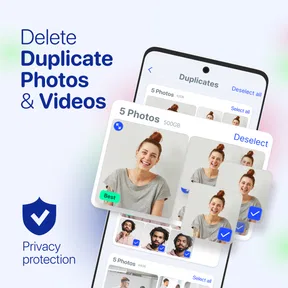
A realistic routine is to check storage before leaving home, look through any duplicate-photo suggestions, and decide what can safely go. I would treat the app as a way to find candidates for cleanup, not as permission to delete everything it highlights. Photos that look alike may capture different expressions or moments, and files that seem disposable can sometimes be useful later. Taking a moment to inspect a selection is a better trade-off than trying to reclaim space in a rush.
Speed expectations and the value of a scan
The main benefit I would expect from a cleaner is a clearer view of storage, not a dramatic transformation of the phone's processor. Removing unneeded material can make room for new photos, downloads, and app updates, but it does not automatically make every app open faster. If the device feels slow because several apps are demanding attention or the phone is older, clearing files may help with one part of the problem without fixing the rest.
That distinction matters when judging the result. I would first note what was difficult before cleaning—such as being unable to save a video—and then check whether that particular task is easier afterward. A storage tool is doing useful work if it helps resolve that bottleneck; a general feeling that the phone should now be “new” is a less reliable measure. I prefer that grounded test to expecting a cleaner to improve every aspect of performance.
Getting Started with AI Cleaner
First things first, downloading AI Cleaner - Phone Cleaner was a breeze. Available on both Android and iOS, you can snag it from the Google Play Store or Apple App Store without any hassle. Once installed, the app greets you with a sleek, intuitive interface that's easy to navigate. I was immediately struck by how user-friendly it was, which is a huge plus if you're like me and don't want to spend hours figuring out how to use a new app.
AI Cleaner is a free tools app from GRIMLAX TRADE, S.L., and it has a 4.3 average from around 143,000 ratings, with more than five million installs. Its age rating is Everyone, and version 1.10 is the current version. Those details suggest it has reached a broad audience, but popularity alone does not tell me whether a particular cleanup decision is right for my phone. I would still judge it by how clearly it presents items and how much control I have before removing anything.
Features That Stand Out
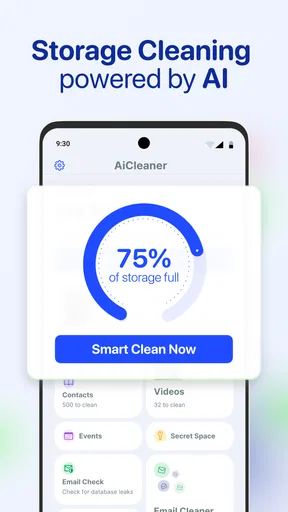
The app offers a variety of features designed to optimize your device. One of the standout features is the junk file cleaner. In just a few taps, AI Cleaner scans your device for unnecessary files that are taking up space. I was amazed at how much junk was lurking on my phone! With a simple tap, I cleared out gigabytes of space, making my phone feel brand new.
For a less hurried workflow, I would scan first and clean in smaller batches instead of approving a large group at once. That is particularly sensible when the phone contains work downloads, travel documents, or files shared in messaging conversations: something that looks old or redundant may still have a purpose. If the amount of available space is the real concern, starting with material I recognize—such as duplicate pictures I have already checked—is a safer way to build confidence than deleting unfamiliar items.
The duplicate-photo angle is most helpful when a camera roll has grown through repeated saves, edits, or transfers. I would compare the images before choosing one to keep, since near-duplicates can differ in focus, crop, or timing. The practical trade-off is simple: a careful review takes longer, but it lowers the chance of losing a version I actually wanted. People with small, carefully curated photo libraries may gain less from this than someone who regularly saves and reshares images.
Security and Privacy
In today's digital age, security is a top priority, and AI Cleaner doesn't disappoint. The app includes a privacy scanner that checks for risky apps and permissions. I found this particularly useful in identifying apps that were accessing more data than necessary. It gave me peace of mind knowing that my personal information was a bit more secure.
I see a scan of app permissions as a prompt to review, not an automatic verdict that an app is dangerous. Some permissions make sense for an app's job, while others may be optional or no longer needed. If I spot something unexpected, I would check the app's purpose and adjust the permission through the phone's own settings where appropriate. This cautious approach is more useful than changing access blindly and then wondering why a trusted app stopped working as expected.
Battery Management
If battery life is a constant worry for you, AI Cleaner's battery saver feature is a game-changer. It analyzes battery usage and suggests optimizations to extend your phone's life. I found this feature incredibly helpful, especially on days when I was out and about and needed my phone to last as long as possible.
For an ordinary day away from a charger, I would use battery information to identify which habits are worth changing, then choose adjustments that fit how I use the phone. A battery suggestion is not automatically a good one if it interferes with notifications or an app I rely on. I would also avoid expecting a cleaner to restore a battery that has physically aged; reducing avoidable drain and improving battery health are different goals.
Heavy-use moments and everyday trade-offs
The app makes the most sense during bursts of phone use: after recording a long event, downloading maps and documents for a journey, or saving a batch of shared photos. Those are moments when storage can become an immediate obstacle, and a focused check can be more convenient than manually searching through every category. For someone who rarely takes photos or downloads files, though, a dedicated cleaner may have little to do most days.
My advice is to avoid turning cleanup into a reflex. Scanning because the phone feels busy is not the same as having a storage problem, and repeatedly clearing items without checking them can create extra work if something must be downloaded again. I would make a cleanup pass when space is genuinely tight, review the suggested items, and then leave the phone alone until there is a practical reason to return.
Reliability and recovery-minded use
Any tool that helps remove files deserves a careful user, even when its interface feels straightforward. Before a substantial cleanup, I would make sure important photos and documents are already backed up through a method I trust. That is a sensible safeguard for any storage-management routine, not a claim that a particular deletion can always be undone. If I am uncertain about an item, keeping it is usually the better choice.
I would also check the results in the phone's own storage view after a cleanup rather than relying only on a celebratory message. That gives me a more concrete sense of whether the problem I wanted to solve has changed. If a warning remains, the next step may be reviewing large videos or apps I no longer use, rather than repeating the same scan and hoping for a different outcome.
Real-World Performance
After using AI Cleaner for a week, I have to say, my phone's performance has noticeably improved. It's quicker, more responsive, and I no longer have to deal with the dreaded "storage full" notification. The app runs smoothly in the background, ensuring my device is always in top shape without me having to lift a finger.
When I assess speed, I separate storage relief from general responsiveness. A phone with more free space may be less frustrating when saving new content, but that does not prove every slowdown came from clutter. I would watch for repeatable changes in the task that was causing trouble, such as whether a download can finish or a new photo can be saved, instead of assuming that a single cleanup explains a broad improvement.
There is also a useful comparison with the built-in storage controls on a phone. Those native tools are often the better first stop for someone who wants the most direct view of storage and prefers not to add another app. AI Cleaner is more appealing if its guided presentation makes it easier to spot cleanup opportunities, especially duplicate pictures, but I would not install it simply to replace a basic check I already find easy to do.
Device constraints and who should choose another approach
AI Cleaner is free to download, with in-app purchases priced from $4.99 to $79.99 per item. I would begin with the free experience and decide whether any paid option solves a problem I actually have before spending money. The presence of in-app purchases does not make an upgrade necessary for everyone; a person who only wants occasional storage checks may be satisfied without paying, while someone considering a purchase should review its terms in the app first.
It is also worth matching the app to the device and the person using it. The minimum operating-system requirement is version 10, so I would check compatibility before planning to use it on an older phone. Someone who is comfortable sorting photos and storage manually may prefer the built-in tools and avoid another interface. Likewise, anyone who wants every deletion handled automatically should reconsider that expectation: personal files call for human judgment, however convenient a scan may be.
On a device already short on space, adding any utility deserves a little thought. I would install it only if the potential convenience is worth the room it takes and would remove it later if it does not become part of a useful routine. That is a practical constraint rather than a reason to dismiss the app outright, but it matters most on phones where every bit of storage is already spoken for.
Final Thoughts
Overall, AI Cleaner - Phone Cleaner exceeded my expectations. It's a versatile, powerful app that delivers on its promises. Whether you're looking to free up space, boost your phone's performance, or enhance security, this app has got you covered. It's like having a personal assistant for your phone, making sure everything runs smoothly.
My more measured verdict is that the app is best for people who want a guided way to review storage and tidy a busy phone, particularly when photos and accumulated files are the main headache. It is less compelling for someone with plenty of space, a simple camera roll, or a preference for managing everything through the phone's existing settings. I would use it as a focused helper, not as proof that every performance issue has a cleanup solution.
If you're tired of dealing with a sluggish, cluttered phone, give AI Cleaner a try. It's a small investment for a significant return in performance and peace of mind. So go ahead, download it, and let your phone breathe a little easier. Trust me, you'll wonder how you ever lived without it!
Verdict
Strengths of AI Cleaner - Phone Cleaner
- Efficient junk file removal
- User-friendly interface
- Boosts device performance
- Quick scan feature
- Minimal ads
Limitations of AI Cleaner - Phone Cleaner
- Requires in-app purchases
- Limited free features
- Occasional false positives
- No cloud backup integration
- Consumes battery power
Other Releases by GRIMLAX TRADE, S.L.
View All
Home Interior Decor: AI Design
House & Home4.1
Similar Picks in This Category
View All
Google LLC4.0

Gboard - the Google Keyboard
Google LLC4.5

Google Play services
Google LLC4.3

Google Play Store
Google LLC4.9

Files by Google
Google LLC4.5

SHAREit: Transfer, Share Files
Smart Media4U Technology Pte.Ltd.4.3
Frequently Asked Questions
What is AI Cleaner - Phone Cleaner and how does it work?
AI Cleaner - Phone Cleaner is a mobile application designed to optimize your smartphone's performance by removing unnecessary files, clearing cache, and managing storage effectively. It uses advanced AI algorithms to identify and delete redundant files without affecting important data, ensuring your device runs smoothly and efficiently.
Is AI Cleaner - Phone Cleaner safe to use on my device?
Yes, AI Cleaner - Phone Cleaner is designed with user safety in mind. It uses secure algorithms to ensure that only unnecessary files are targeted for deletion, protecting vital data. However, it's always recommended to back up important information before using any cleaning app, just to be extra cautious.
What features does AI Cleaner - Phone Cleaner offer?
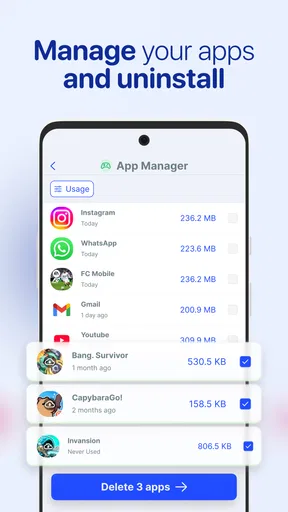
AI Cleaner - Phone Cleaner offers a variety of features including junk file removal, cache clearing, RAM boosting, battery optimization, and app management. It also provides real-time monitoring of your device's performance, helping you keep track of storage usage and system health effectively.
Will AI Cleaner - Phone Cleaner improve my phone’s battery life?
Yes, AI Cleaner - Phone Cleaner includes features that help optimize your device’s battery life. By removing background apps and unnecessary processes, it reduces the workload on your phone’s CPU, which can lead to improved battery performance and longer usage times between charges.
Does AI Cleaner - Phone Cleaner require a subscription or in-app purchases?
AI Cleaner - Phone Cleaner is available as a free download with basic features. However, it may offer premium features through in-app purchases or a subscription model. These additional features often include more advanced cleaning tools, ad removal, and personalized support options.
